
Claims that don't live in someone's inbox
DealersCircle’s Warranty Claim Management module replaces the back-and-forth of emails, phone calls, and paper forms with a structured, guided process that keeps manufacturers and dealers aligned from submission to resolution. Every claim has full context, full history, and a clear paper trail.
The problem it solves
- Claims submitted incomplete, requiring multiple rounds of follow-up
- No visibility into whether a product is still under warranty before filing
- Parts shipped when the dealer already has them in stock
- No way to tie warranty costs back to specific recalls or service communications
- Claims lost between email threads with no audit trail of who did what
Warranty status tracking
- Know coverage before the claim is filed.
Warranty coverage types are configured at the company level and applied to product models automatically. When a new product order is created, the appropriate coverage is already in place. - Configurable Coverage
Define coverage duration by months, engine hours, miles, or a combination of criteria. Set different terms for original owners versus subsequent owners. Override coverage on specific products for special circumstances. Propagate new coverage types down to existing product orders. - Instant Visibility
Dealers and manufacturers can see the current warranty status of any product at a glance and drill into the specific coverage types applied, their validity, and remaining duration. Warranty status is displayed to the dealer at the time a claim is filed, so there’s no guessing.



How it works for Manufacturers
Full Adjudication Control
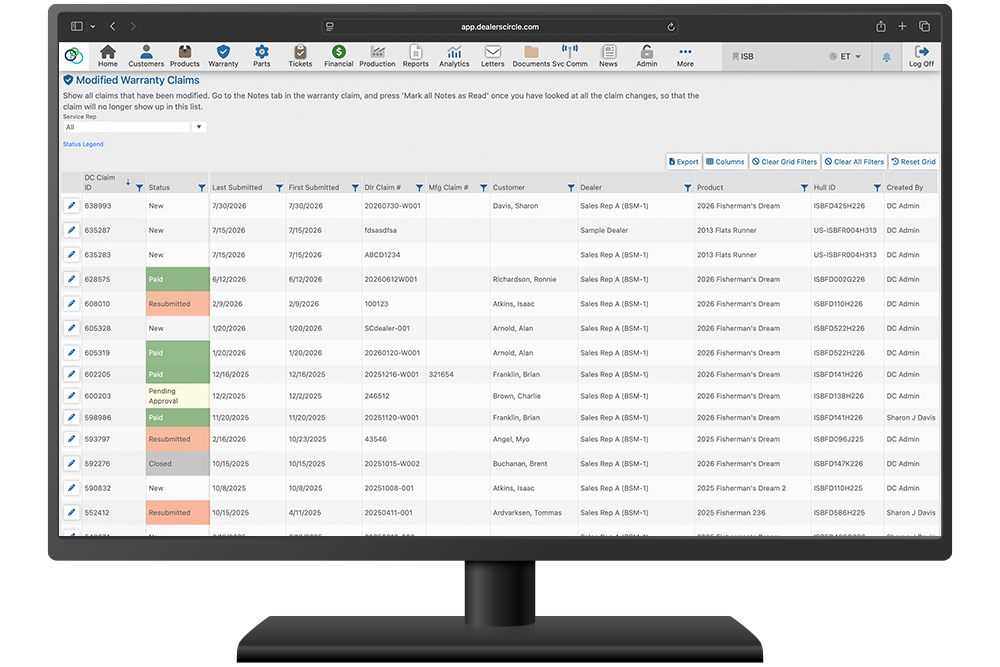
Claims arrive pre-structured with all required information attached. Review and take action directly in the platform: send back to the dealer requesting additional info or adjustments, place into Pending Approval status (allowing parts to ship while the dealer completes work), accept, or decline.
Configurable to Your Process
Numerous configuration settings let you run warranty management the way your business requires. Choose between two modes of operation: parts and labor completely separate, or parts directly associated to labor items. Configure labor entry from free-form to fully restricted pre-configured selections, with multiple scenarios in between.
Codification & Reporting
Create unique/specific codes and assign them at the claim and/or part and labor line item level. This allows for reporting and analysis across claims of your expenditure per code. Associate service communications (recalls, bulletins) to claims, parts, or labor items so costs are tracked per communication.
Shipment & Fulfillment
Enter shipment tracking per part line item, which generates tracking emails with direct carrier links to dealers. Mark parts as “Do Not Ship” when a dealer will use stock on hand.
Queue Management
Claims in process stay in a Current queue. Processed claims archive to History, keeping your team focused on what needs attention now.
How it works for Dealers
Guided Submission
Create warranty claims through a simple, question-based wizard that ensures product statuses are maintained properly and claims are filed under dealer stock or the appropriate retail customer. Required information like engine hours, mileage, or failure date is collected before submission so nothing comes back incomplete.
Parts & Labor
Add parts directly from the manufacturer’s catalog, or enter manually if the manufacturer allows it. Labor items follow the configuration your manufacturer has set, from free-form to structured selection.
Attachments & Context
Add unlimited images and documents to any claim. At the time of creation, any relevant service communications (recalls) are displayed. A History tab shows all previous claims on the same product. A Tickets tab surfaces any service tickets that preceded the claim.
Track Status in Real Time
Complete delivery to your retail customer directly in DealersCircle. Warranty registration happens at the point of sale or delivery; no separate process is required.

Built in safeguards
- Warranty status check at time of filing, no more guessing coverage
- Wizard-based submission ensures completeness before the claim is sent
- Filter parts by the specific product or product model to reduce incorrect selections
- Audit trail logs every user action and change with timestamps on every claim
- Configurable notifications alert the right people when attention is required
- Service communication association ties costs to specific recalls or bulletins
- Unlimited attachments on every claim, no file limits
- Do Not Ship flag prevents unnecessary parts fulfillment
Before you decide
How do dealers submit a warranty claim?
Through a guided, question-based wizard that walks them through the process and validates required information before submission. Claims arrive structured and complete.
Can I see if a product is still under warranty before filing?
Yes. Warranty status is visible at a glance on any product and is displayed to the dealer at the time a claim is created, showing coverage types and remaining validity.
What happens after a dealer submits a claim?
The manufacturer reviews and can accept, decline, request additional information, or place into Pending Approval status. Dealers are notified at every step.
Can I track costs associated with a recall?
Yes. Service communications can be associated to a claim, individual parts, or labor items, allowing you to report warranty costs per recall or bulletin.
What if the dealer already has the part in stock?
Parts can be marked “Do Not Ship” indicating the dealer will use stock on hand and doesn’t need fulfillment.
Is there a complete history?
Every action on every claim is logged with the user, the change, and the timestamp. Plus, all previous claims on the same product are accessible from a single History tab.
Can coverage terms differ by owner type?
Yes. Warranty coverage can specify different durations for original owners versus subsequent owners, and coverage can be overridden for specific products to handle special circumstances.
See Warranty Claim Management in action.
Request a DemoHave questions about how this fits your process?
"*" indicates required fields